Previous development of the fictional Boxpark Sushi brand determined that the brand voice is wise and friendly, and the tone is playful. These traits are demonstrated in the dynamic vision board, a motion design video created in Adobe After Effects. Typography, primary colors, and directive words were established in the brand’s static vision board but adjusted after critiques from Jose Caceres and Dr. Adam Baldowski.
Motion
Attribution free stock video clips were selected from Pixababy and Pexels after searching general terms like “fun” and “laughter” to find inspiring images with orange and blue colors similar to the brand color palette established in the static vision board. Also, specific search terms like “sensei” and “water drop” helped find desired clips.
The motions and editing are energetic yet fluid like a martial art. Transitions are smooth and organic with no hard cuts. These traits reflect the fun yet wise brand personality, the Mr. Miyagi-esque “sushi sensei” who represents the Boxpark Sushi brand. Many visual elements are introduced by scaling up from small to large, utilizing the concept of “looming motion” to capture attention. Looming motion occurs when visual stimuli get larger or closer, capturing more attention than receding motion because “…looming objects are more likely than receding
objects to require an immediate reaction…” (Franconeri & Simons, 2005). In other words, the human brain is hard-wired to recognize potential threats such as an approaching predator. This human instinct is frequently called upon in motion design to draw attention to specific visual elements.
Sound
The music bed “Yellow Rose of Berkeley” by Rondo Brothers was selected from the Youtube Audio Library because of its upbeat tempo and fun energy. The musical frequencies of the piece were also considered, as midrange to high frequencies can convey happiness and forward thinking (Gillespie, 2019).
The claps in the beat provided edit points to pop in the vector sushi elements and final logo. Because the original music was almost two minutes long, a shorter thirty second version was edited in Adobe Audition. Chalkboard scratches, laughter, and other sound effects were also added from Adobe free sound effects to add depth to the animation.
Colors and Textures
Boxpark Sushi’s primary and secondary colors are orange and light blue, reflecting the energy and wisdom of the brand. These colors are displayed in the video clips and graphic elements of the dynamic vision board. The two complementary colors are balanced between warm and cool, providing a harmony that balances the energy of the motions.
The blackboard background texture used in the brand’s static vision board is carried over to the dynamic vision board. This texture represents the educational nature of Boxpark Sushi and the sushi sensei while providing an organic neutral background for graphics and text.
References:
Franconeri, S., & Simons, D. (2005). The dynamic events that capture visual attention: A reply to Abrams and Christ (2005). Perception & Psychophysics, 67(6), 962.
The Organizational Structures course provided deep knowledge about the structures of motion, storytelling, and design employment. New skills were developed for both academic and occupational applications. This paper examines each assignment and the resources used to complete the assignment.
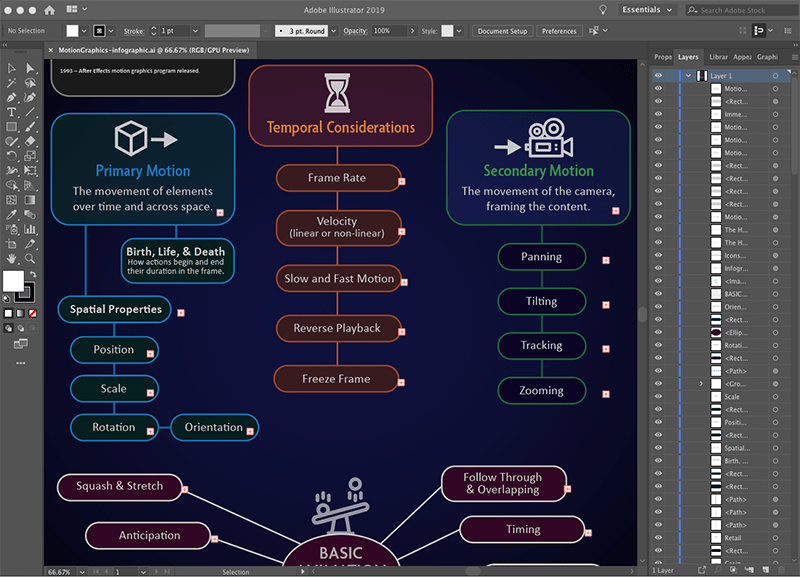
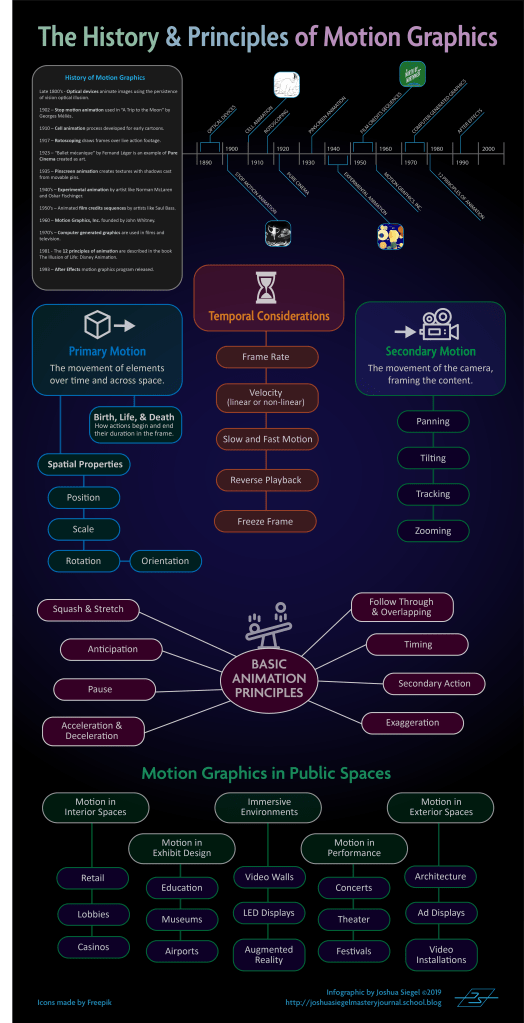
Week one began with research into the structure of motion. Krasner (2013) provided a brief history of motion graphics, examples of motion graphics in public spaces, and the basic concepts of motion literacy including the principles of animation. The first assignment for the week’s mastery journal was to create an infographic based on what we learned from the readings. Tutorial videos by Harmer (2019) demonstrated how to create vector infographics with Adobe Illustrator.
Screenshot of creating an infographic in Adobe Illustrator.
Also in week one, we were assigned groups for a video discussion. Although this discussion would not take place until later in the month, our group connected by email to discuss availability for an online meeting. The purpose of this meeting was to meet our peers and share what we learned in the class.
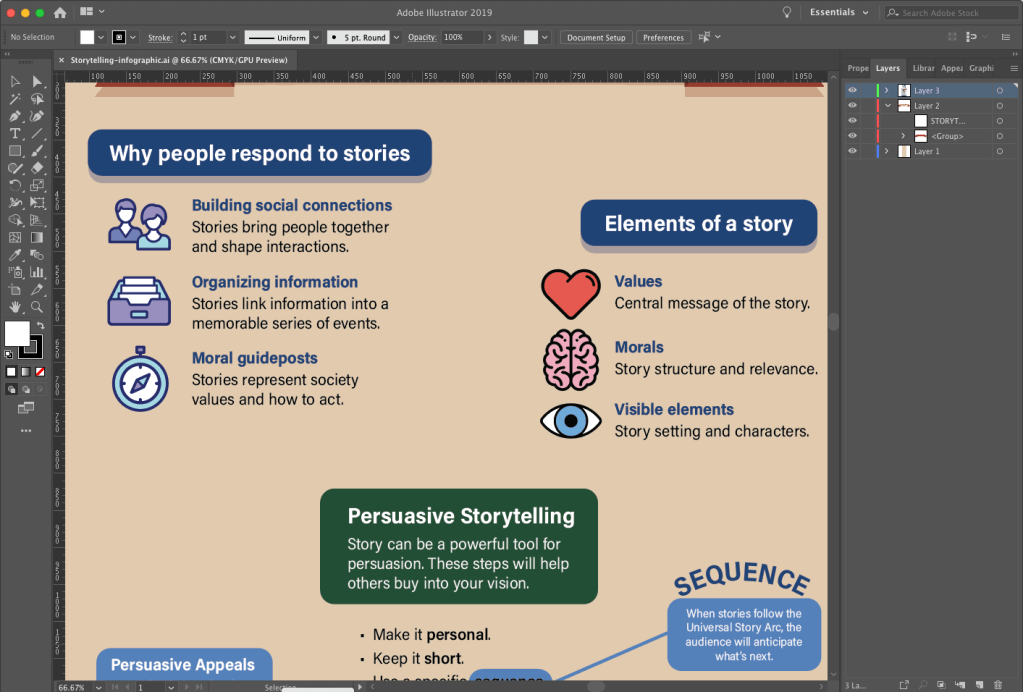
In week two we researched the structure of storytelling in design. Krasner (2013) described conceptualization in motion design. Huber (2017) supported Krasner’s ideas for creative inspiration and using previsualization techniques like concept sketches and storyboards to develop story ideas. She also provided insight on storytelling with video, from preproduction to post-production. The assignment for this week’s mastery journal was to create another infographic based on what we learned from the readings.
Screenshot of creating an infographic in Adobe Illustrator.
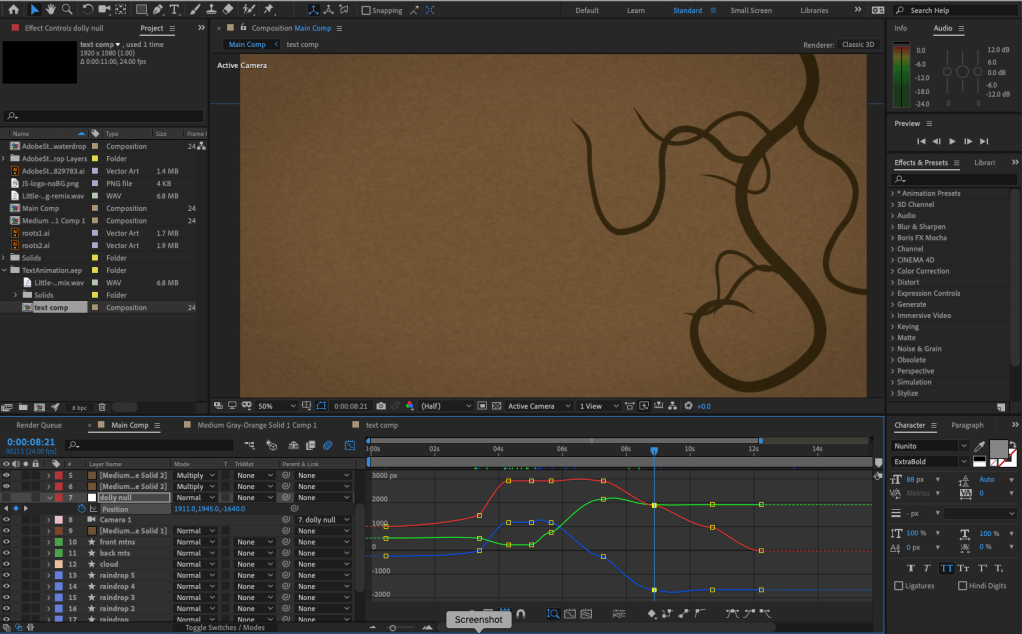
Week two also contained an After Effects Design Challenge to demonstrate our motion graphics skills. Video tutorials from Robinson (2019) imparted new knowledge and skills within Adobe After Effects like using the Graph Editor to make keyframed movements smoother and more natural.
Screenshot of creating a motion design in Adobe After Effects
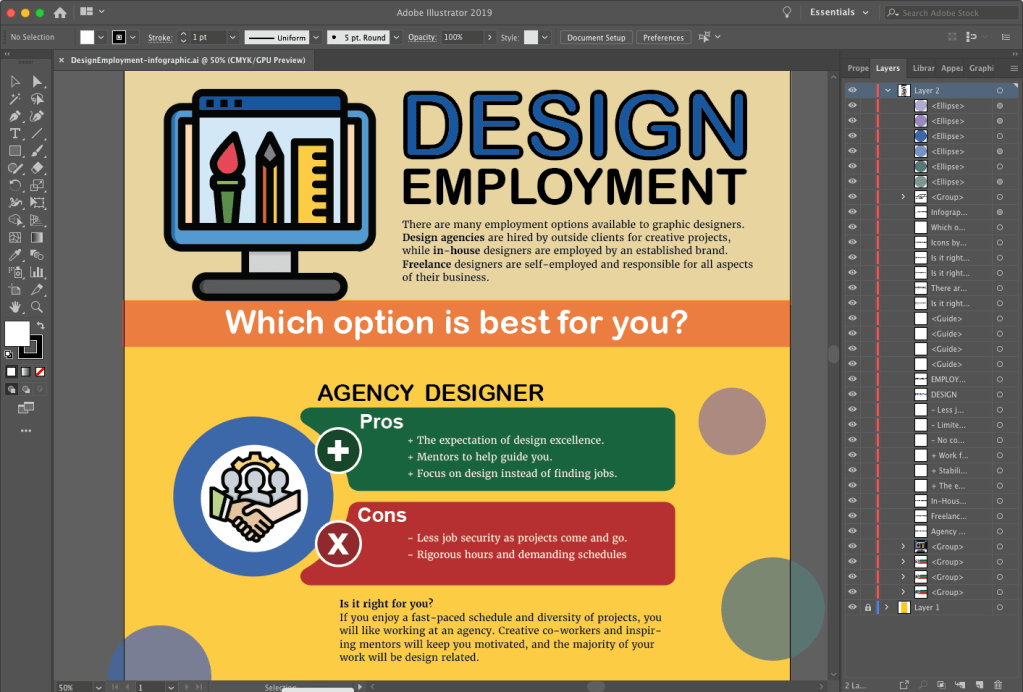
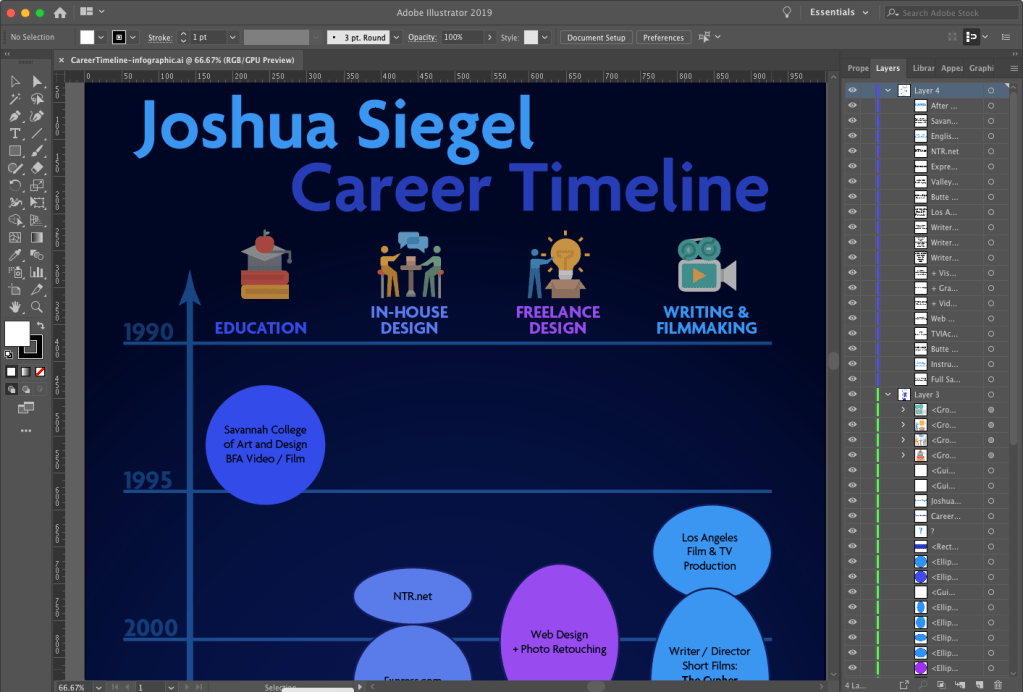
In week three we researched the structure of design employment. Articles by Flavin (2017), Castillo (n.d.), and others described the pros and cons of working in-house, with a design agency, and freelance. This information was used to create another infographic for the mastery journal. In addition to this infographic outlining what we learned about design employment, we created a visual timeline of our employment in the different employment sectors.
Screenshot of creating an infographic in Adobe Illustrator.Screenshot of creating a timeline infographic in Adobe Illustrator.
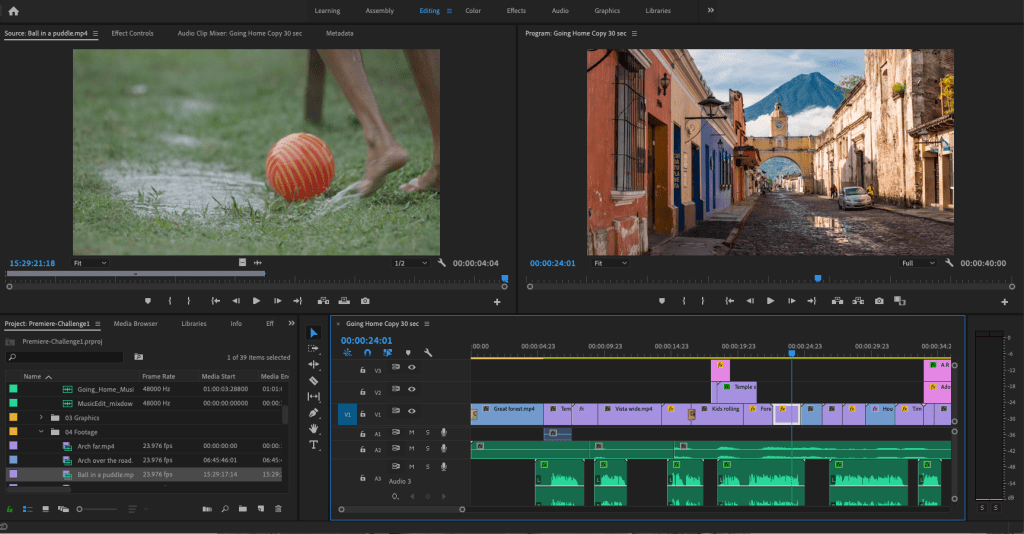
Also in week three, we completed a Premiere Pro design challenge. The “Going Home” video used by Jago (2017) as an example in the Adobe tutorials was a good demonstration of Premiere’s tools. I edited a forty second video using the music, voiceover, and footage provided in the tutorial sample files.
Screenshot of editing video in Adobe Premiere Pro.
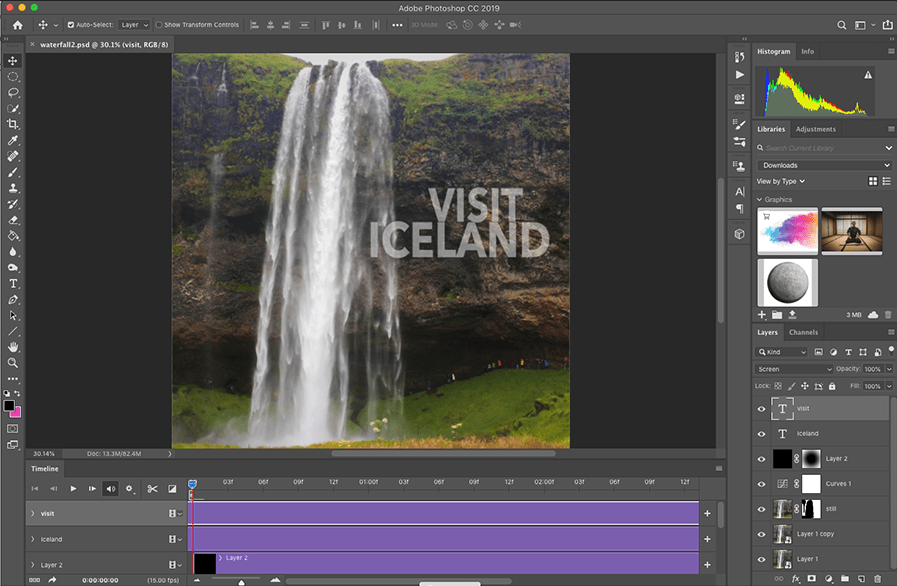
For week four’s design challenge, students were given the choice of creating a Kinetic Typography animation, three Cinemagraphs, moving Parallax Images, or a Motion Poster. I created the cinemagraphs in Photoshop, following tutorials from Duggan (2016).
Screenshot of creating a cinemagraph in Adobe Photoshop.
Week four imparted the academic knowledge and practice of creating an annotated bibliography. We learned that the annotated bibliography is not a summary. Instead, it is an analysis of the central theme and scope of the article or book. The six sources of motion and storyboarding information researched for this assignment are useful resources for future courses.
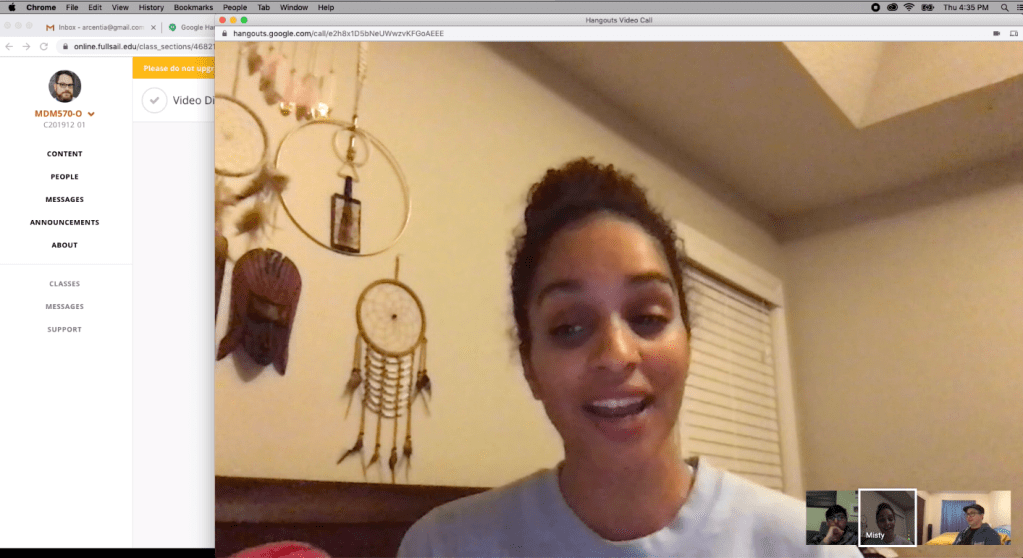
The video discussion arranged in the first week took place on Thursday, December 19. Our group discussed the assignments and learning materials, as well as sharing examples of motion design storytelling in real-world applications like motion posters for films. The meeting effectively wrapped up our experience in Organizational Structures by sharing with our peers.
Video discussion screenshot.
Connecting/Synthesizing/Transforming
This month’s research and assignments imparted a great deal of information, both conceptual and technical. Krasner (2013) provided a wide perspective on the history, concept, and techniques of motion design. He emphasized that storyboards are a valuable tool for conceptualization and ideation, in addition to outlining a story in the preproduction stage. Huber (2017) supported the importance of developing stories with previsualization tools like concept sketches and storyboards.
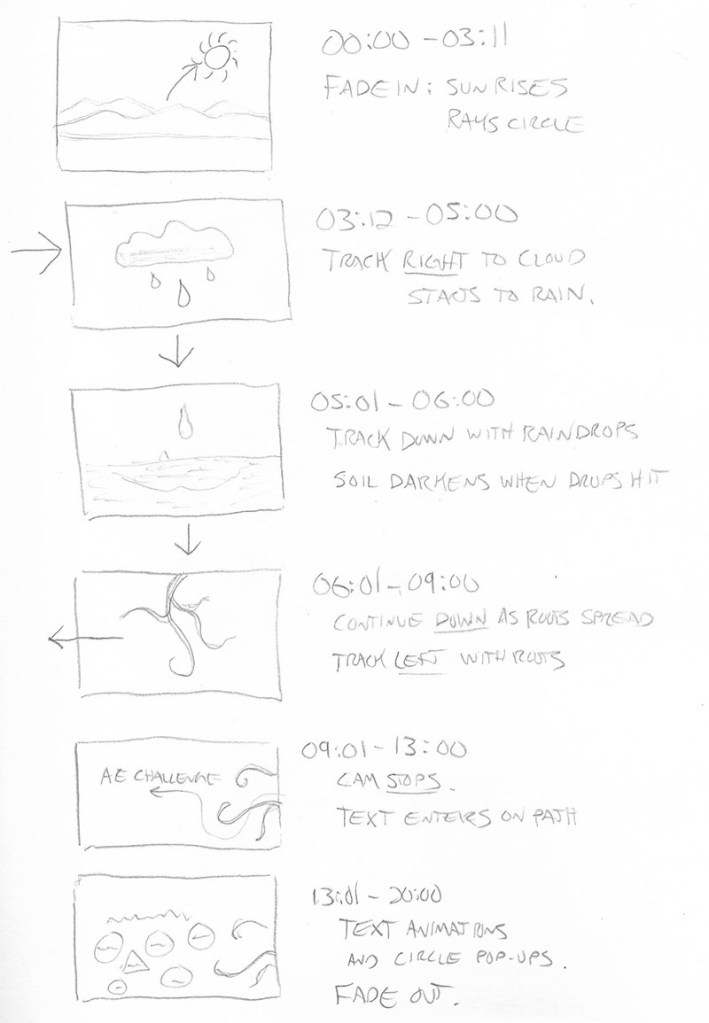
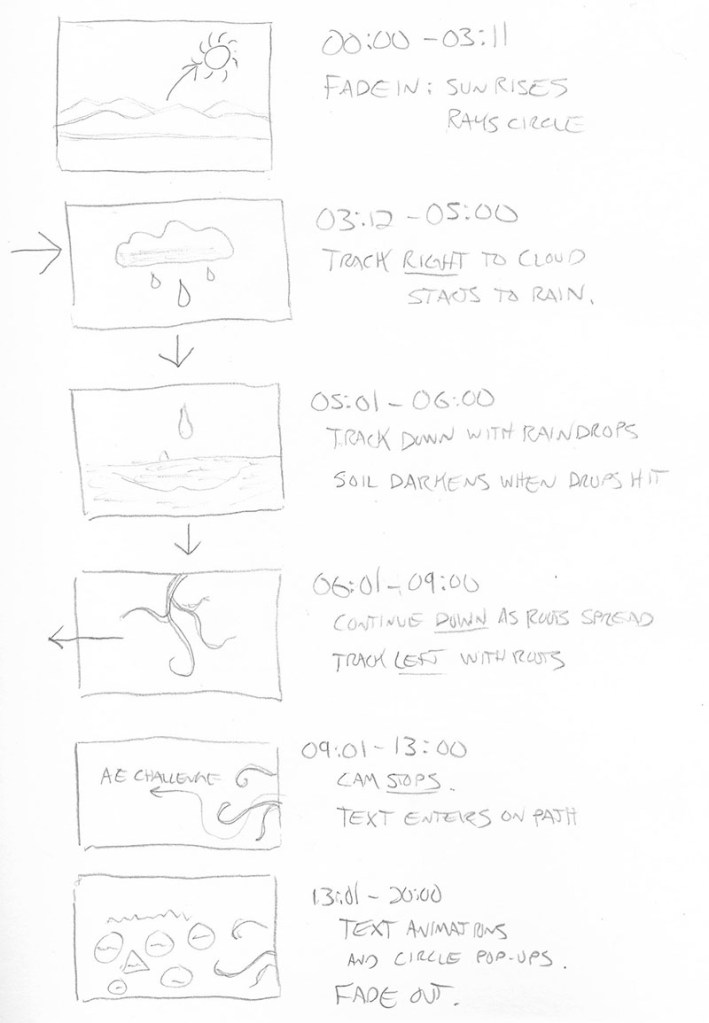
For the After Effects design challenge, I used storyboards to plan, plot, and time my motion graphic.
I transformed this knowledge into a 20-second animation that follows the movements of nature (a rising sun, falling rain, and growing roots) to illustrate the Principles of Animation created by Disney animators and explained by Krasner (2013). While creating the motion graphic, I consulted LinkedIn Learning tutorials by Robinson (2019) for technical ways to make animations follow the principles more closely. This research revealed how to use easy ease key-framing and the graph editor to make movements smoother and more organic.
Problem Solving
One design problem I resolved this month was the pacing of the Premiere Pro design challenge video. The “Going Home” promo video edited by Jago (2017) as an example in the Adobe tutorials was a good demonstration of Premiere’s tools, but the pace of the 60-second edit felt very slow and plodding compared to the upbeat music and imagery. I first created a 30-second edit that was too fast-paced, so I tried another 40-second cut. This edit contained all the information of the example video, but with a pace and run-time more appropriate for the short attention spans of social media.
Innovative Thinking
This month I created my first infographics and cinemagraphs. Although I am proud of my first efforts, they do not yet compare to the work of professional designers. Much more practice and experimentation are needed to get to that level. My video editing and motion design skills are more developed, but still need much improvement.
Creating my first cinemagraphs required going outside my comfort zone to work with video in Photoshop. The first two were relatively straight forward, but the Hawaii postcard cinemagraph was more challenging because there was no easy way to make the video loop. Instead, I used time remapping to make the video bounce back and forth in time. While not very realistic, this “ping-pong” type motion is used in many animated GIFs that are shared on social media.
Acquired Competencies
The following are concepts, skills, or new resources learned in the Organizational Structures course. They are categorized as Academic (pertaining to school work) or Occupational (pertaining to work in the Media Design field), and Technical (pertaining to software or other design skills) or Conceptual (new terminology, procedures, or ideas).
Academic
Technical
Conceptual
A story’s theme is its underlying message.
A story’s tone should align with its audience, its values, and its message.
Story Elements: Values: central message of the story. Morals: story structure and relevance. Visible elements: story setting and characters.
Logline: a one sentence summary that conveys the central message of the story.
A creative portfolio is not about showing 20 decent pieces, it’s about showing 5 great pieces.
Motion Graphics in Public Spaces: LED technology makes large public displays more interactive and purpose driven.
Motion Graphics in Film, Television, and Interactive Media: Animation can entertain, inform, and drive audience participation by combining traditional graphic design with the visual language of film.
BENSOUND is an excellent resource to find royalty-free music for motion graphics and video presentations.
AIGA: the professional association for design offers resources for students and professional designers.
Precursors of Animation: Multiple optical devices used the persistence of vision phenomenon to achieve early forms of animation.
Early Cinematic Inventions: Animation evolved with motion pictures in many forms including stop-motion and cell animation.
Experimental Animation and Innovators: Animators create new techniques for motion design and pure artistic expression.
Aristotle’s Three Persuasive Appeals: Ethos – The credibility of the speaker or story. Logos – The logic of a story’s message. Pathos – The emotional engagement of the audience.
Synaesthesia: a merging of senses (ie: hearing colors).
Causal Reasoning: the process of identifying relationships between a cause and a corresponding event.
Designs can be “hacked” by repurposing existing images and ideas.
Communication skills and availability are essential for freelancers.
Mentors can often be found at design agencies.
Occupational
Technical
Conceptual
Principles of Animation: The basic language of how objects move was established by Disney animators and described in the book The Illusion of Life by Frank Thomas and Ollie Johnston (1995).
Materials: real-world textures, materials, and found objects can provide inspiration and add authenticity to design.
Audience Segmentation: analyzes audience characteristics including demographics, psychographics (i.e., personality), and firmographics (or business setting).
Affective Primer: the process of manipulating the emotions of an audience before the message is delivered.
Creating Adobe Illustrator Infographics: Adobe Illustrator, Microsoft Excel, and other programs provide many tools for creating data-driven illustrations.
Adobe After Effects Graph Editor adjusts motion keyframes for more realistic, organic animations.
Lumetri Color panel allows for easy color grading within Adobe Premiere.
Essential Sound panel lets you improve sound quality within Adobe Premiere.
Cinemagraphs are still photographs that contains a small moving element.
Universal Sequence or story arc: Set up – Establishes time, place, and characters. Tension point – A problem or challenge is presented. Turning point – A possible solution or twist is introduced. Resolution – The conclusion reinforces the core message.
Pictorial Continuity: cohesion in content and style of visuals.
Sequential Continuity: logical flow of events between frames.
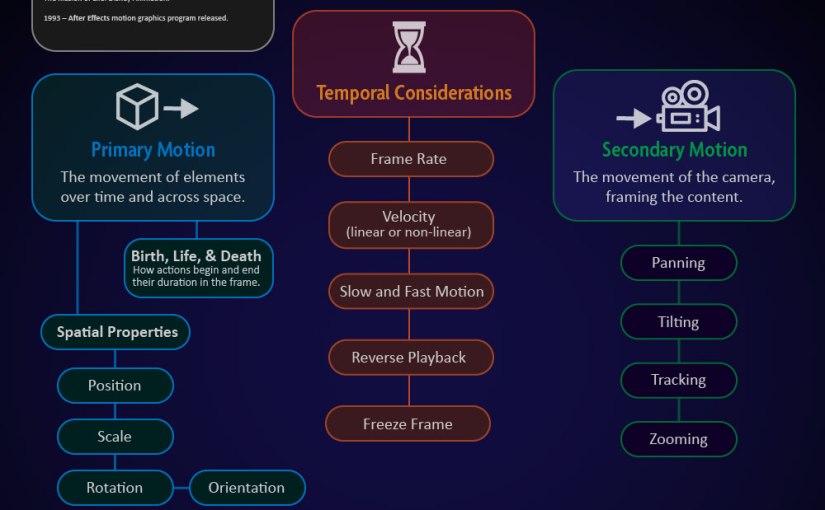
Primary (Object) Motion: Animation of an element’s spatial properties and how it moves over time and across space.
Secondary (Camera) Motion: Movement of the camera and how it frames the content.
Temporal Considerations: Linear movements mimic mechanical devices, while non-linear movements are more natural. Techniques such as slow motion and reverse playback can alter the sense of time.
In-house designers must be proactive, otherwise they are just following orders.
The primary role of in-house designers is explaining the brand to consumers.
Freelance designers can often pick up jobs from overloaded design agencies.
It’s important to be aware of current design trends and knowledgeable of graphic design from the past.
This week we learned more about the Storytelling process and how stories are used in design.
Beard’s design experiment
Critiques from twenty-three designers demonstrated how many approaches there are to design. One consistent theme is that inspiration can be found through explorations of different materials and real life interactions. For example, Jason Munn states that “A lot of stuff I do is trying to combine imagery to make something new,” (Beard, 2013). Munn encourage Beard to play with the interactions between letterforms and soap bubbles. Beard’s experiments demonstrated how natural patterns and geometric shapes provide inspiration for new ways to mix type and objects in design.
Furthermore, Skolos and Wedell (2012) combine found objects, sculpture, photography, and digital media in a process that is more exploration than design. Collage techniques and material experimentation can drive inspiration for Motionographers as well. If I were presented with this design challenge, a motion poster could be very effective. One possible approach is using imagery of soft, white soap bubble washing over a filthy texture to reveal the message.
Static vs. Dynamic media
During the week 2 live session, Dr. Baldowski remarked that motion designers must speak the languages of film, design, and animation. Static media like print ads convey a message with a single image, utilizing research and multiple iterations to find the most effective design solution. Dynamic media uses similar processes but requires additional planning to address the structure and pacing of the narrative over time. Storyboards are “a cohesive succession of frames that establishes a concept’s basic narrative structure” (Krasner, 2013). Animatics (animated storyboards) can also be used to resolve motion and timing issues when static storyboards aren’t enough.
Making images meaningful
According to Wujec (2009), there are three components to making images meaningful. First is to clarify ideas by visualizing them. This activates the ventral stream on the left side of the brain which visually identifies what something is. The second component is making the images interactive to engage the viewer. This activates the dorsal stream in the brain which helps create mental maps. The third component is creating visual persistence. Recognizing familiar objects and detecting patterns activates the limbic system, a very primal part of the brain. By visualizing ideas, making them interactive, and making them persistent a designer can engage three areas of the human brain for more meaningful communication.
I started using Adobe After Effects in 2009 to create titles and visual effects for my independent films. Websites like Creative Cow and Video Copilot taught me the basics, but there’s always something new to learn.
Step 1 – Concept: I wanted to create a nature-inspired animation that leads the viewer through a scene. First, I found a peppy music bed called “Little Tiny Song” by Matai on freeadmusic.com and used Adobe Audition to edit a 20 second remix of the song. The childlike cheerfulness of the music inspired me to use simple cardboard cutout style shapes to create most of the graphic assets.
Step 2 – Storyboarding: After marking the music beats, I drew Storyboards with rough timing.
animation storyboard
Step 3 – Animation timing: I created a 1920 x 1080 Composition and drew several Shape Layers to represent the ground, mountains, sun, cloud, and raindrops. I added a Camera to the composition and made the shape layers 3D. I parented the camera to a Null Object and Keyframed the null object’s position to move it through the scene.
Step 4 – Details and refinement: After roughly timing the layer animations and camera movements to sync with the music, I added details like Textures, a Repeater animation on the sun rays, Write-on Effects for the roots and darkening the wet dirt with a feathered animated Mask set to the Multiply Blending Mode. The roots and text animations were Precomposed, and I used the Graph Editor to fine-tune animation keyframes.
Step 5 – Rendering: Finally, I turned on Motion Blur for all layers and Rendered the final composition using Adobe Media Encoder rather than the After Effects render queue.
Innovative Thinking
This design challenge pushed my Adobe After Effects skills in new directions. The project demonstrated my ability to create complex motion graphics using the tools within After Effects and the concepts of animation and storytelling. Tutorials from Adobe and LinkedIn Learning helped me apply previously unknown features and effects to the project.
The final composition moves the audience through the scene along with the music. If I had more time for the project, there are many details I would adjust. But overall, it shows that I can create complex motion graphics in a short time.
Acquiring Competencies
The most important skill I learned was using the Graph Editor to adjust motion keyframes for more realistic, organic animations. Instead of just applying Easy Ease to keyframes, I used the Graph Editor on the majority of keyframes in the design challenge timeline. This tool will help all my future motion designs feel more natural and realistic.
I also gained experience using other apps and features of Adobe Creative Cloud including Color for palette creation, Photoshop and Illustrator for asset creation, Audition for editing audio, Bridge for previewing animation presets, and Media Encoder for rendering.
The Structure of Motion in Design Its history, theory, and application
Overview
The majority of this week’s information comes from the book Motion Graphic Design, 3rd Edition by Jon Krasner (2013). Krasner provides a brief but thorough review of the history, inventions, and innovators of Motion Graphics. He describes the many applications of Motion Design in film, television, interactive media, and public spaces.
Furthermore, Krasner explains the basic theories and principles of animation. These principles were established by Disney animators and described in the book The Illusion of Life by Frank Thomas and Ollie Johnston (1995). The online article “Understand Disney’s 12 Principles of Animation” by Tammy Coron (2019) summarizes the book and provides sample animations for each principle.
The concepts learned from these books and articles were displayed in an infographic created in Adobe Illustrator. Prior to creating the infographic, I completed the LinkedIn Learning course “Illustrator Infographics” by Tony Harmer (2019).
Certificate – Creating Illustrator Infographics
Acquired Competencies
The following are concepts or skills learned in the first week of the Organizational Structures course. They are categorized as Academic (pertaining to school work) or Occupational (pertaining to work in the Media Design field), and Technical (pertaining to software or other design skills) or Conceptual (new terminology, procedures, or ideas).
History of Motion Graphics (academic, conceptual)
Precursors of Animation: Multiple optical devices used the persistence of vision phenomenon to achieve early forms of animation.
Early Cinematic Inventions: Animation evolved with motion pictures in many forms including stop-motion and cell animation.
Experimental Animation and Innovators: Animators create new techniques for motion design and pure artistic expression.
Motion Literacy (occupational, technical)
Primary (Object) Motion: Animation of an element’s spatial properties and how it moves over time and across space.
Secondary (Camera) Motion: Movement of the camera and how it frames the content.
Temporal Considerations: Linear movements mimic mechanical devices, while non-linear movements are more natural. Techniques such as slow motion and reverse playback can alter the sense of time.
Principles of Animation: The basic language of how objects move was established by Disney animators and described in the book The Illusion of Life by Frank Thomas and Ollie Johnston (1995).
Motion Graphics in Public Spaces: LED technology makes large public displays more interactive and purpose driven.
Motion Graphics in Film, Television, and Interactive Media: Animation can entertain, inform, and drive audience participation by combining traditional graphic design with the visual language of film.
Infographics Design (occupational, technical)
Creating Adobe Illustrator Infographics: Adobe Illustrator, Microsoft Excel, and other programs provide many tools for creating data-driven illustrations.
Week One of the Organizational Structures course was an introduction to Motion Design. The Live Session video was prerecorded because of the Thanksgiving holiday. This week’s instructional materials introduced motion graphics foundations like the principles of animation and offered insights from several industry leaders.
Motion Design Insights
Brandon Parvini of Ghost Town Media remarks “When everyone else is getting trained by the exact same teachers, everyone’s work starts looking the same” because designers are learning techniques from the same online tutorials (Cox & Parvini, 2014). To differentiate from competitors, inspiration should be found outside of the motion design field. Explore music, architecture, nature, anything that stretches the mind in new directions. Research should be fun. Alberto Scirocco (2014) supports this methodology by advising designers to explore different aspects of their creativity and bring those lessons back to their designs.
Alberto Scirocco and the Motion Graphics of leftchannel
Scirocco states that “Good design connects a message with a person” (Scirocco, 2014). Motion Designers use variety of techniques that require trial & error, exploring how things move and elements interact. It’s important to know typography, color theory, animation principles, and more. Specialization is good, but you should at least know the terminology of other disciplines. Scirocco notes that leftchannel designers rotate through roles on different projects. Having a balance between technical skill and creativity is important. “The more experience you have, the more complexity to you as an individual, the more interesting your work is going to be” (Scirocco, 2014). Furthermore, Jeremy Cox (2014) recommends looking outside the art world to things like data visualization in the tech world.
Diegetic and Non-diegetic Sound
Sound is often the last thing considered when creating motion designs and films. But as Star Wars creator George Lucas once noted, “Sound is half the experience.” A skillfully crafted soundscape immerses the audience in the experience. When talking about sound design, Josh Hanson (2014) describes the difference between Diegetic Sound and Non-diegetic sound.
Diegetic: Sounds that on-screen character(s) would hear such as dialogue and sounds occurring within the film.
Non-diegetic: Sounds that on-screen characters won’t hear such as the soundtrack music or narration.
This month I enrolled in the Adobe Education Exchange course Motion Graphics for Educators. I’ve been creating motion graphics for many years, but the class helped me better integrate the newest versions of Adobe Illustrator and After Effects.
WORKSHOP 1: CREATING A STORYBOARD
For this assignment, I chose to animate a logo that I recently created. Exquisite is a possible brand for a media design studio, and the animation can be used to promote motion graphics services.
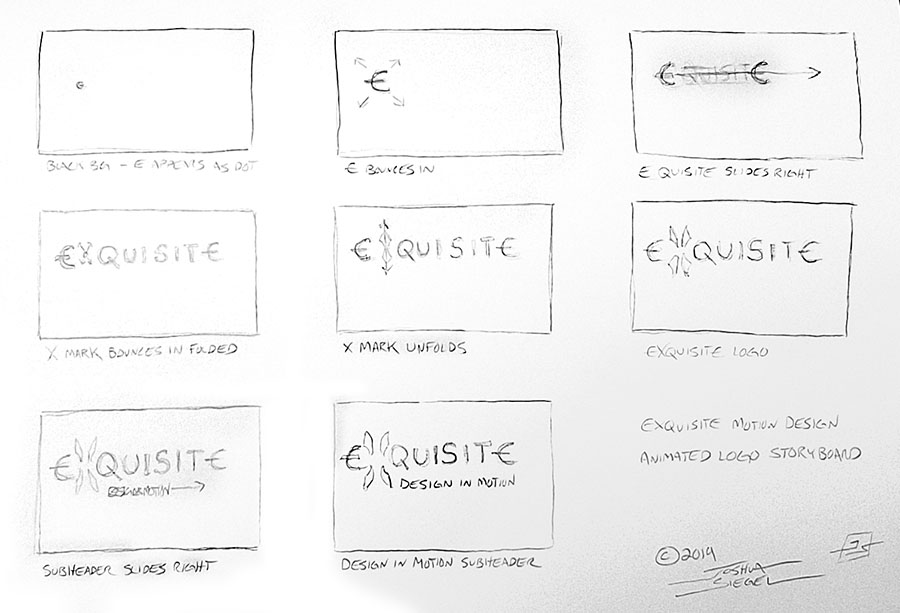
eXquisite logoeXquisite logo animation storyboard
The entire animation will be about 6-8 seconds. As a filmmaker and motion graphics designer, I’m a big fan of storyboarding. It’s an excellent tool for planning shots and trying out ideas in rough form before you even start production.
This animation is relatively simple, but the storyboards will keep me on track when creating the vector assets and timing movements.
WORKSHOP 2 – CREATING GRAPHIC ASSETS
The Exquisite logo was already created in Adobe Illustrator, so I only had to add the assets to my Creative Cloud library and export PNGs to show on this page.
Next, we’ll be animating the graphics in Adobe After Effects.
WORKSHOP 3 – SET UP A MOTION GRAPHICS PROJECT
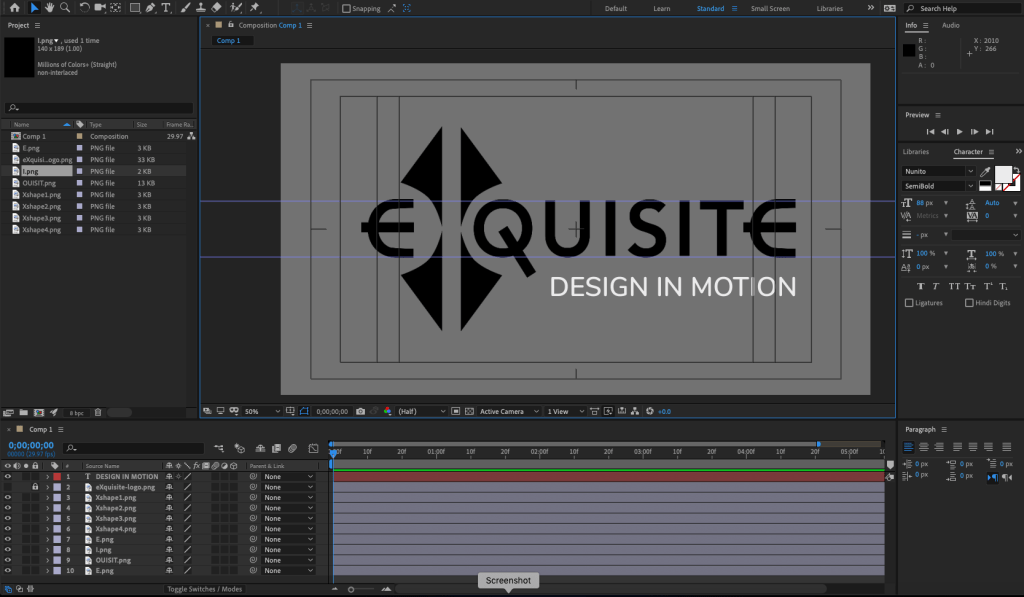
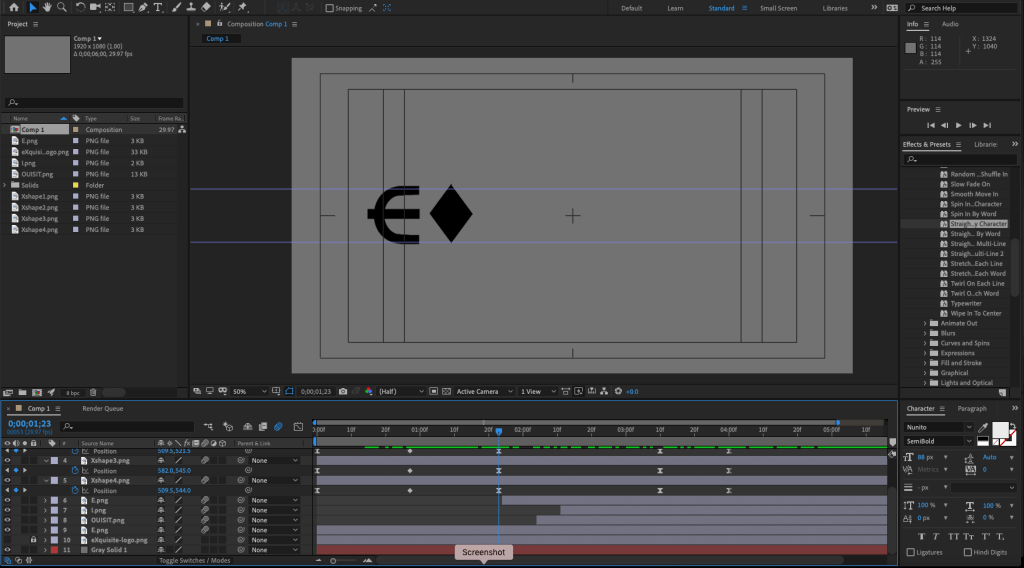
I created a new After Effects composition and imported the graphics assets. A still of the final logo helped me line up everything for the end of the animation.
After Effects project screenshot
I set keyframes for the scale and position of all assets. Next, I will work backwards to the beginning of the animation.
WORKSHOP 4 – MOTION AND VISUAL EFFECTS
With all the visual assets in place, I animated each part starting with the subhead text. For the text reveals, I animated a mask with light feathering. The X logo assets were animated last. After adjusting the timing, I easy-eased the keyframes to make the animation smoother. Finally, I turned on motion blur for all the layers.
After Effects project screenshot
Moving forward with this project, I will experiment with colors, textures, and audio.
WORKSHOP 5 – CREATING A FINAL CUT
After experimenting with metallic textures for the text and background, I decided to keep it simple. I changed the background to dark gray and added a gradient ramp to the main logo. Finally, I added a dark vignette on top of all the layers. Overall the gradient gives the text a 2D lighting effect. On similar projects, I would consider using 3D lighting within After Effects for a more realistic look.
The animations needed some adjustment to make everything smoother and add a little life to the movements. Precomposing the X elements made it possible to add rotation and bounce to the diamond shape before it expands into the X.
The assignment asked for a voiceover, so I tried using my own voice and computer generated speech within Adobe Audition. I experimented with pitch shifting and reverb effects, but nothing felt appropriate for the project. Instead, I mixed a musical sting and a couple whoosh fx to use as the project audio.
eXquisite logo animation
This project was both fun and educational. It was good practice for creating vector assets in Illustrator, animating them in After Effects, and mixing audio with Audition. With these skills I can start making fun explainer videos for my classes.
I’ve been making the most out of my Lynda.com subscription, watching tutorial videos for at least an hour every day. One of the great “Weekly” courses is Motion Graphics Weekly. If you want to learn more about creating 3D graphics in After Effects and Cinema 4D, it’s worth checking out. https://www.lynda.com/After-Effects-tutorials/Motion-Graphics-Weekly/548716-2.html
The coolest thing I’ve discovered there is that a free
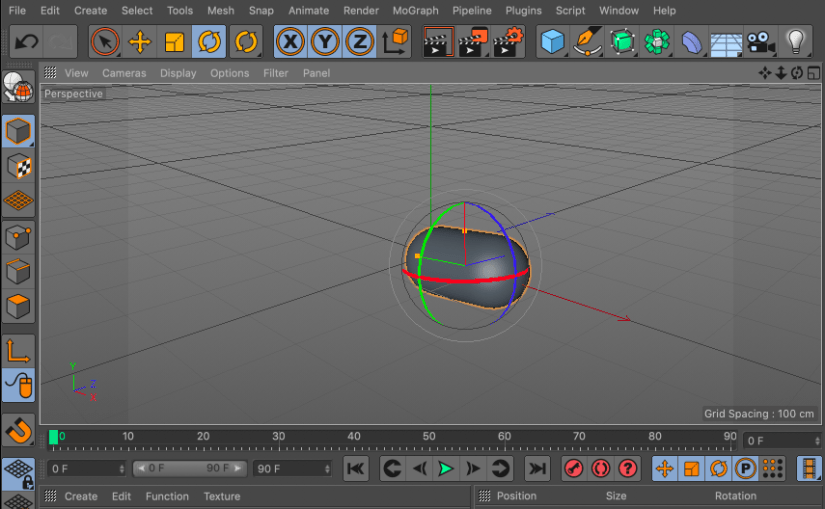
version of Cinema 4D is included with my Adobe Creative Cloud subscription. I
plan to learn more about creating 3D graphics over the next few months and
using Cinema 4D Lite will make the learning curve easier. It will also save some
money.
If you have a Lynda.com subscription, watch this video:
“Go in the
direction of what you love doing because people take notice of passionate
people and of people who work hard.” Andrew Kramer, 2014
When I first
starting using Adobe After Effects, I watched every online tutorial I could
find. Some of the best came from a website called Video Copilot. Andrew Kramer imparted
technical knowledge with wit and humor, educating and entertaining a generation
of indie fx artists and motion designers.
Kramer’s skills
and passion for his craft soon caught the attention of filmmaker J.J. Abrams,
who commissioned Kramer to create titles for Star Trek and other Bad Robot
productions.
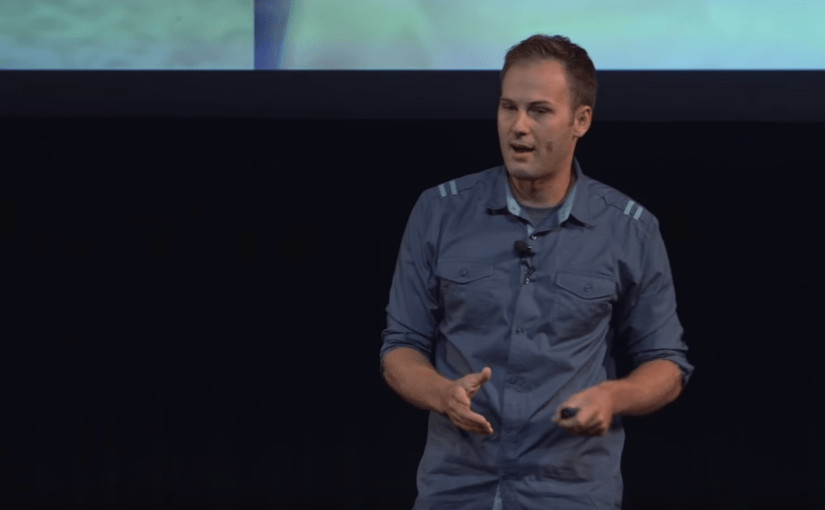
Andrew Kramer was
the keynote speaker at the 2014 AE World Conference. I found his speech to be
both inspirational and entertaining.








 Joshua Siegel's Mastery Journal